Unique Shva Payment Workflows and Error Messages
Shva supports several payment flows in the Israeli market that are not a standard global-scheme gateway integration in most regions. This section documents those flows and how Rapyd processes them.
Supported Shva Transaction Types
Shva supports several domestic transaction types that Rapyd recognizes from the payment request and processes as described in the sections below:
Installments: a purchase split into monthly charges.
Credit payment: an independent credit or financing arrangement.
Standing order: recurring fixed charges.
Friends club / loyalty: club benefits or discounts applied to the purchase.
Offline Capture and Refunds
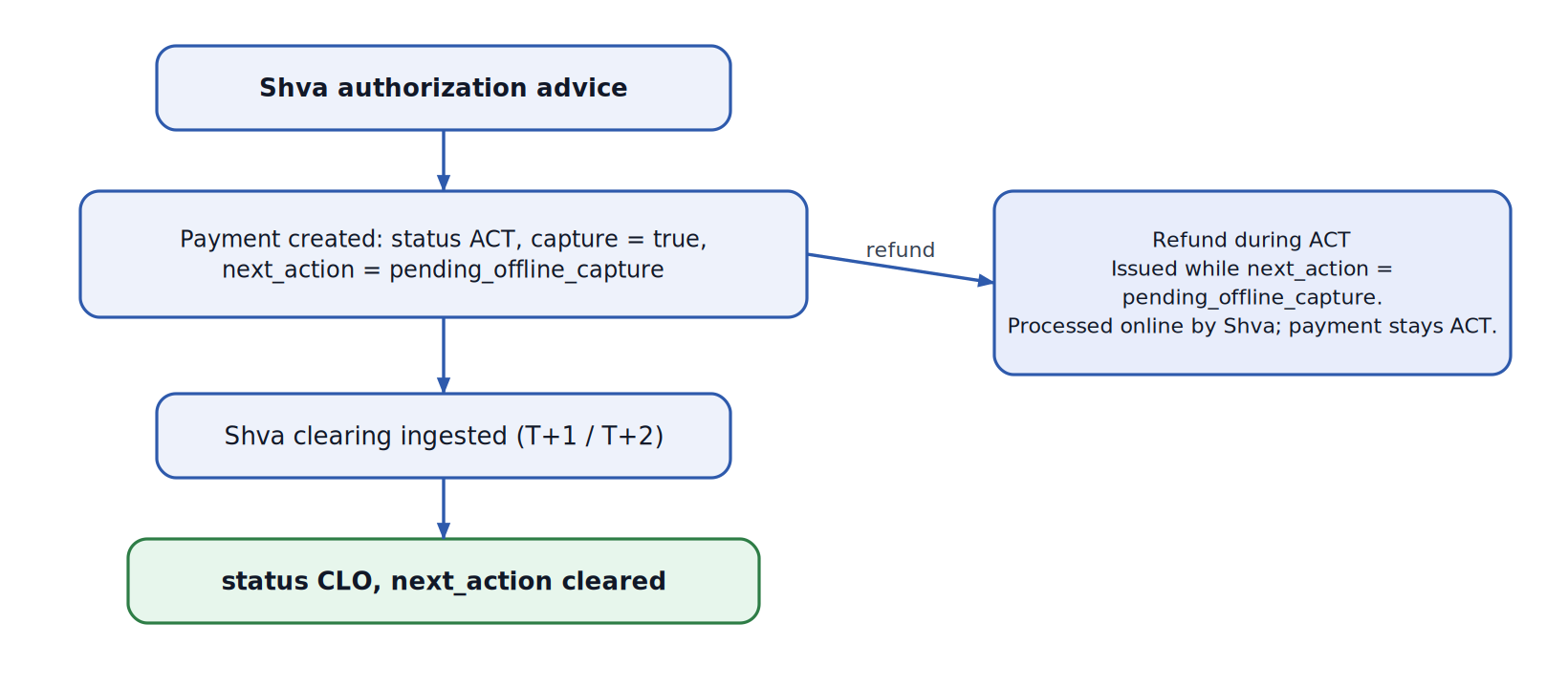
A Shva payment is authorized immediately but settles (captures) later, through the Shva clearing. While it is awaiting settlement, the Rapyd payment is in ACT status with next_action = pending_offline_capture.
Pending offline capture:
When Rapyd creates the payment from the Shva authorization advice, it sets
capture= true,status= ACT, andnext_action= pending_offline_capture.The value applies to both normal sales and installment payments.
When the Shva clearing is ingested (T+1 / T+2), the payment is captured:
capture= true,status= CLO, andnext_actionis cleared.
Refund of an active payment in a pending offline capture status:
A refund can be issued against a Shva payment while it is still ACT and in pending_offline_capture, before the payment closes.
When a merchant creates a refund request, the refunded amount transfers funds to the on-hold balance.
The refund is processed online by Shva in real time and checked against the Rapyd wallet. The payment stays in ACT and is closed as part of the clearing process.
Installments (תשלומים)
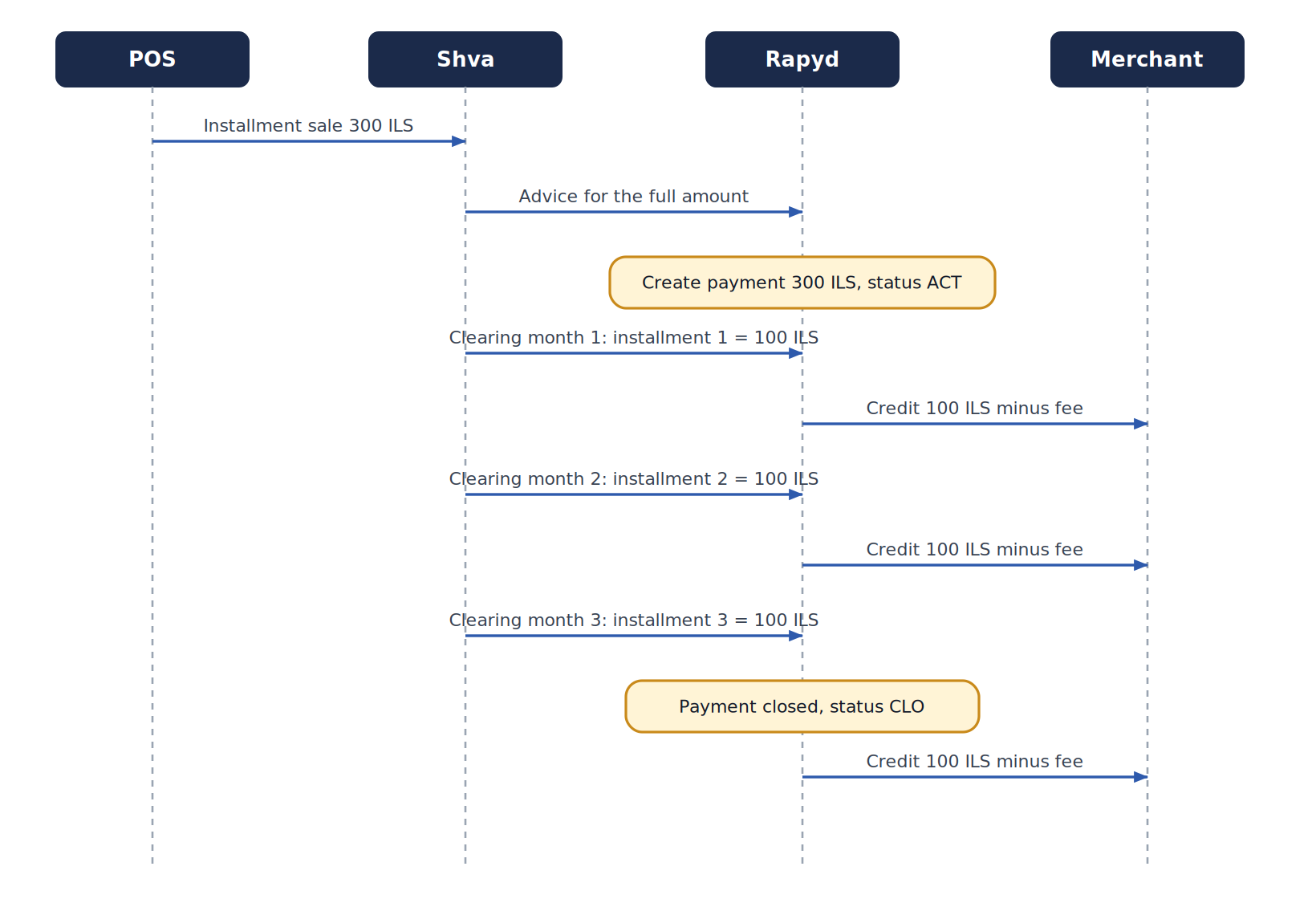
An installment payment splits a single purchase into monthly charges. Rapyd creates the payment for the full amount, then processes it as a plan:
The payment is created for the amount and stays in ACT status until the last installment.
Each installment settles as its own transaction in ILS. The first installment amount can differ from the rest.
The merchant is credited per installment (installment amount minus fee), month by month.
The payment is closed on the last installment. With discounts, closing uses the paid amount on the accumulated net.
Note
To simulate paying installments in the Rapyd sandbox environment, run the Complete Payment request for each installment.
Example - 3 x 100 ILS purchase on 20/02
Date | Event |
|---|---|
20/02 | Payment created: 300 ILS (ACT) |
01/03 | Installment 1: transaction created, 100 ILS. Next day: merchant credited 100 ILS minus fee |
01/04 | Installment 2: transaction created, 100 ILS. Next day: merchant credited 100 ILS minus fee |
01/05 | Installment 3: transaction created, 100 ILS. Payment closed. Next day: merchant credited 100 ILS minus fee |
Hosted Checkout
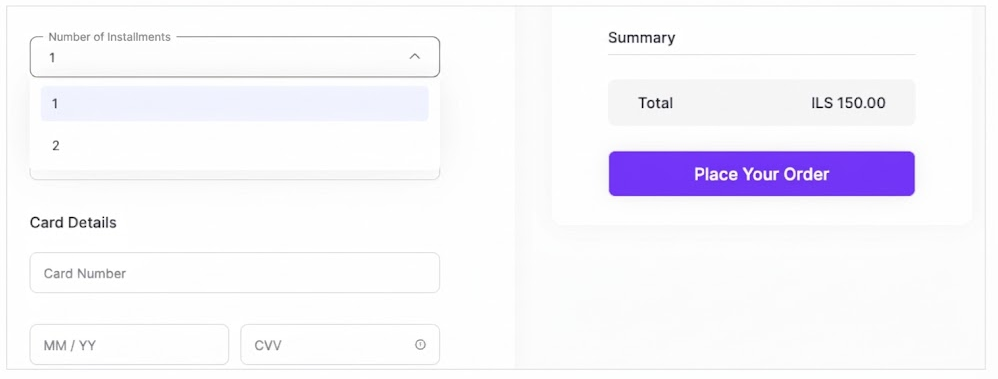
A hosted checkout page that is created via Create Checkout Page with Shva payment methods (for example, il_mastercard_card) can offer the purchaser to buy the product in installments:
Note
Minimum amount for installments is 75 ILS.
It also has these unique requirements:
The ID number of the purchaser must be entered.
The CVV of a saved card that is being used must be entered during the purchase.
Stopping Installments (עסקת עצירה)
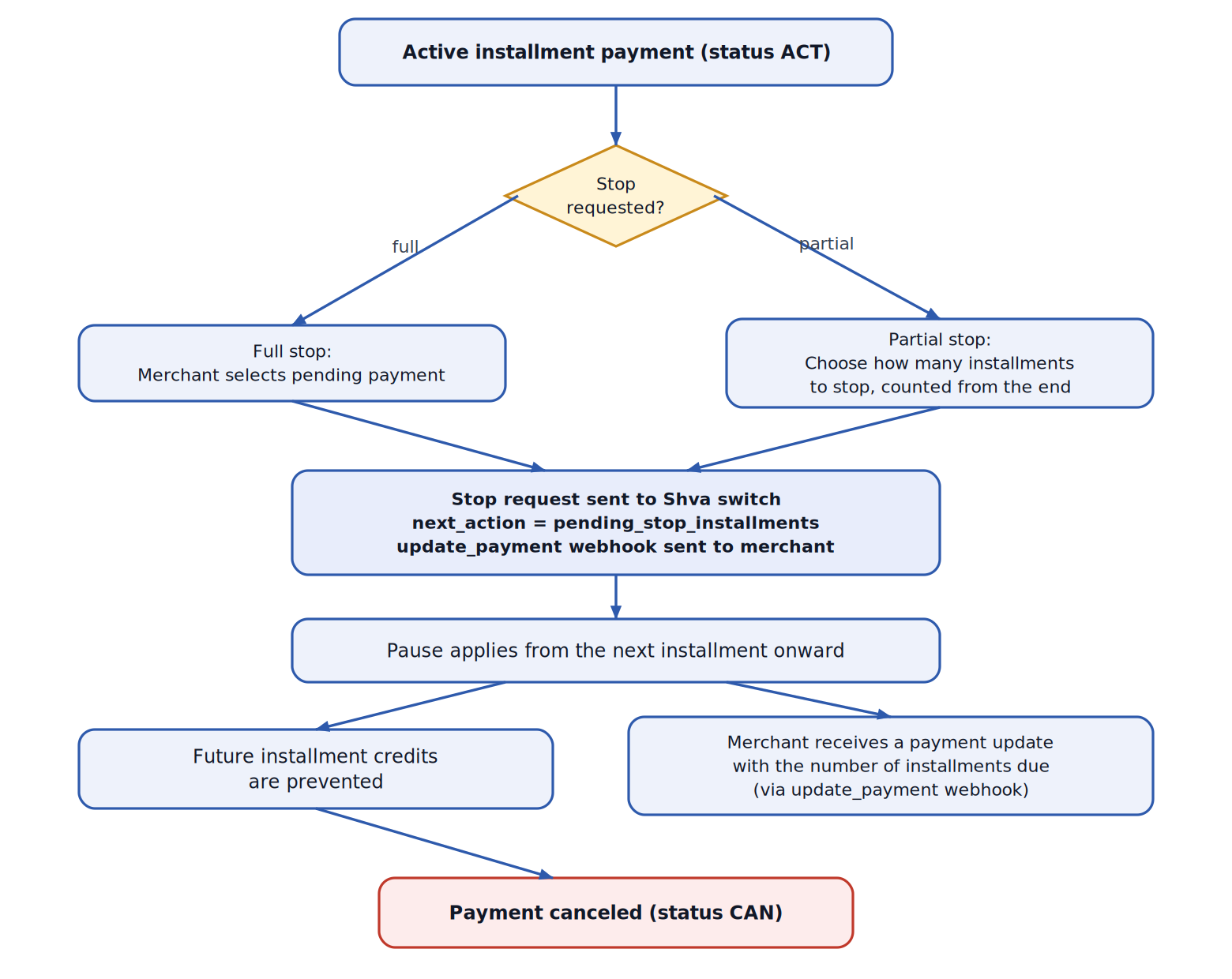
An active installment payment can be stopped. Merchant self-service stop-installment is available in the Client Portal:
Locate the active installment payment in the Client Portal. It shows the current installment information.
Select pending payment and define the number of installments to stop. Select how many installments to stop, counted from the end.
Confirmation: the merchant receives an indication that the installment payment was stopped. pending_stop_installments is the value of
next_actionwhen the merchant requests to stop the installments, and before it is approved. After the approval, the number of installments and the expiration date are updated, and the merchant receives this information via the PAYMENT_UPDATED webhookWhen it applies: the stop applies from the next installment onward, and the payment is then closed.
See also Stopping Installments on a Payment.
Limitations
Stopping future installments applies to installment (תשלומים) payments only. Credit and deferred-charge payments are not supported.
The merchant chooses how many installments to stop, up to a maximum set by Shva based on the installments still to be collected.
In the week before the 2nd of the month (Israel time), the installment due that month can no longer be stopped, so the maximum is the remaining installments minus one. Outside that ‘blackout window’, all remaining installments can be stopped. Any installment that is planned to be paid in the next week cannot be stopped (there is a ‘blackout window’ of 7 days).
While a stop is being processed, a new stop cannot be requested until the next business day.
Stopping installments does not refund amounts already charged. A refund is a separate action.
A refund can be made only up to the amount that has been collected.
A full stop requested before any installment has been collected cancels the payment. A stop sets the payment to canceled (
statusCAN).
Credit Payment (קרדיט)
A Shva credit-type payment turns a purchase into an independent credit line or financing plan, distinct from a single-payment debit and from a fixed installment plan.
Friends Club / Loyalty (מועדון)
Club or loyalty transactions can apply club benefits or discounts. When a discount applies, the payment is closed on the after-discount amount, and the discount details are stored per payment.
Error Messages
This section lists the error messages related to Shva payments and refunds, grouped by the stage at which they occur: card declines, payment creation, and refund or installment-stop operations.
Card Decline Errors
Card operation errors are returned as ERROR_PROCESSING_CARD - <code>, where <code> is the Shva decline code listed in the table below. The generic message is: The request attempted a card operation, but there was a problem with the transaction. The request was rejected. Corrective action: Contact the issuing bank with the two-digit error that appears at the end of the error code.
Decline codes returned by Shva with a positive ReturnCode. For all of them, error_code = ERROR_PROCESSING_CARD and failure_code = the Shva code.
Description | failure_code | Message |
|---|---|---|
Card blocked | 1 | [Blocked] The request attempted a card operation, but the card has been blocked. The request was rejected. Corrective action: Advise the cardholder to contact the issuer in order to unblock the card. |
Stolen card — confiscate | 2 | [Stolen Card, pick up] The request attempted a card operation, but the card issuer wants the card returned because the cardholder reported it stolen. The request was rejected. Corrective action: Consider not doing business with this customer. In addition, if you have the physical card, confiscate it and return it to the issuer. |
Call credit company | 3 | [Refer to card issuer] The request attempted a card operation, but the card issuer refused the transaction. The request was rejected. Corrective action: Advise the customer to use a different payment method and contact the card issuer. |
Transaction not approved | 4 | [Do Not Honor] The request attempted a card operation, but the card issuer refused the transaction. The request was rejected. Corrective action: Advise the customer to use a different payment method. |
Counterfeit card | 5 | [Pick Up Card, no fraud] The request attempted a card operation, but the card issuer wants the card returned. The request was rejected. Corrective action: Advise the cardholder to contact the card issuer to resolve the problem. In addition, if you have the physical card, confiscate it and return it to the issuer. |
Wrong CVV2 | 6 | [Security Violation] The request attempted a card operation, but there was a problem with the card’s security features. The request was rejected. Corrective action: Verify the CVV, or advise the cardholder to use a different payment method. |
Wrong CAVV/UCAF | 7 | [Authentication Required or Activity Limit Exceeded] The request attempted a card operation, but 3DS was not completed or the transaction would exceed the card’s activity limit. The request was rejected. Corrective action: Resubmit with 3DS required or use another payment method. |
Wrong AVS | 8 | [Address Verification Failed] The request attempted a card operation, but the billing address provided did not match the information on file with the card issuer. The request was rejected. Corrective action: Resubmit with the correct billing address or advise the customer to use a different payment method. |
Communication disconnect | 9 | [System Malfunction] The request attempted a card operation, but the issuing bank was temporarily unavailable. The request was rejected. Corrective action: Try again. If the error persists, advise the customer to use a different payment method. |
Partial approval | 10 | [Partial Approval Granted] The request attempted a card operation, but the card issuer only authorized a portion of the requested amount due to available balance limits. The request was partially approved. Corrective action: Process the remaining balance by using another payment method of the customer or void the transaction. |
Card not authorised for terminal | 12 | [Transaction not Permitted in Terminal] The request attempted a card operation, but the terminal is not authorized for this type of transaction. The request was rejected. Corrective action: Advise the customer to use a different payment method. |
Card not in network | 14 | [Unsupported Card Network] The request attempted a card operation, but the card brand or network provided is not accepted by the payment processor. The request was rejected. Corrective action: Advise the customer to use a different payment method. |
Card expired | 15 | [Expired Card] The request attempted a card operation, but the card has expired. The request was rejected. Corrective action: Advise the cardholder to use a different payment method, or contact the card issuer to issue a new card. |
Currency not permitted | 16 | [Currency Not Permitted] The request attempted a card operation, but the processing currency specified is not supported by the merchant account. The request was rejected. Corrective action: Resubmit the transaction using a supported currency or advise the customer to use a different payment method. |
Credit type not permitted | 17 | [Credit Terms Not Permitted] The request attempted a card operation, but the requested credit terms are not supported by the card issuer or merchant account. The request was rejected. Corrective action: Advise the customer to use a different payment method. |
Wrong HolderID | 26 | [Invalid Cardholder ID] The request attempted a card operation, but the cardholder identification number provided did not match the information on file with the card issuer or was formatted incorrectly. The request was rejected. Corrective action: Resubmit with the correct cardholder identification number or advise the customer to use a different payment method. |
Acquirer: tx type not permitted | 300 | [Invalid Transaction] The request attempted a card operation, but the card is not authorized for this type of transaction. The request was rejected. Corrective action: Advise the customer to use a different payment method. |
Acquirer: currency not permitted | 301 | [Currency Not Permitted by Acquirer] The request attempted a card operation, but the processing currency specified is not supported by the acquirer. The request was rejected. Corrective action: Resubmit the transaction using a supported currency or advise the customer to use a different payment method. |
Acquirer: CNP not permitted | 303 | [CNP Not Permitted] The request attempted a card operation, but the transaction was identified as Card Not Present (CNP), which is not authorized for this merchant account or terminal. The request was rejected. Corrective action: Advise the customer to use a different payment method. |
No permission for MIT | 348 | [MIT not Permitted] The request attempted a card operation, but a Merchant-Initiated Transaction (MIT) is not permitted. The request was rejected. Corrective action: Use a different payment method of the customer. |
ECI mandatory for ecom terminal | 385 | [Electronic Commerce Indicator Required] The request attempted a card operation, but the mandatory Electronic Commerce Indicator (ECI) was missing for the card not present transaction. The request was rejected. Corrective action: Resubmit the transaction including a valid ECI value. |
Installments above max | 401 | [Installment Plan Exceeds Maximum] The request attempted a card operation with an installment plan that exceeds the maximum number of installments permitted for this card. The request was rejected. Corrective action: Resubmit the request with a supported number of installments or advise the customer to use another payment method. |
Installments below min | 402 | [Installment Plan Below Minimum] The request attempted a card operation with an installment plan that is below the minimum number of installments permitted for this card. The request was rejected. Corrective action: Resubmit the request with a supported number of installments or advise the customer to use another payment method. |
Amount below min per payment | 403 | [Payment Amount Below Minimum] The request attempted a card operation with an installment payment amount that falls below the minimum permitted per payment. The request was rejected. Corrective action: Resubmit the request with a higher transaction amount, reduce the number of installments, or advise the customer to use another payment method. |
Installment sum mismatch | 406 | [Installment Sum Mismatch] The request attempted a card operation where the sum of all installment payments does not match the total transaction amount. The request was rejected. Corrective action: Resubmit the request ensuring the installment amounts add up to the total transaction amount. |
Expiry invalid | 416 | [Expired Card] The request attempted a card operation, but the card has expired. The request was rejected. Corrective action: Advise the cardholder to use a different payment method, or contact the card issuer to issue a new card. |
Missing required parameters | 418 | [Missing Required Parameters] The request attempted a card operation but one or more required parameters were not provided. The request was rejected. Corrective action: Resubmit the request with all required parameters populated. |
Wrong card number | 447 | [Invalid Card Number] The request attempted a card operation, but the card issuer did not recognize the card number. The request was rejected. Corrective action: Correct the card number or advise the customer to use a different payment method. |
Invalid ECI value | 506 | [Invalid Electronic Commerce Indicator] The request attempted a card operation, but the Electronic Commerce Indicator (ECI) value provided is not valid for this transaction type. The request was rejected. Corrective action: Resubmit the transaction with a valid ECI value, or advise the customer to use another payment method. |
Payment Creation Errors
Errors returned when creating a Shva payment.
Installment and Credit Amount Errors
Error code | Message |
|---|---|
ERROR_CREATE_PAYMENT_INSTALLMENT_AMOUNT_LESS_THAN_MINIMUM | The request tried to create an installment payment, but one or more installment amounts were less than the minimum allowed for the payment method. The request was rejected. Corrective action: Set every installment amount, including the first, to an amount greater than or equal to the configured minimum installment amount. |
ERROR_CREATE_PAYMENT_CREDIT_AMOUNT_LESS_THAN_MINIMUM | The request tried to create a credit payment, but one or more credit installment amounts were less than the minimum allowed for the payment method. The request was rejected. Corrective action: Set every credit installment amount to a value greater than or equal to the configured minimum credit installment amount. |
Arena System Errors
System errors returned by the Shva arena with a negative ReturnCode.
Shva ReturnCode | Description | failure_code | error_code | Action |
|---|---|---|---|---|
-1 to -20 | Credentials / auth errors | raw value | ERROR_CREATE_PAYMENT | Check JWT, mTLS |
-21 | Error saving data | -21 | ERROR_CREATE_PAYMENT | Contact Shva |
-22 | Error during processing | -22 | ERROR_CREATE_PAYMENT | Contact Shva |
-88001 | Duplicate TransactionUniqueID | — | — | Query existing transaction |
-96 | TLS / security error | -96 | ERROR_CREATE_PAYMENT | Check mTLS cert |
-97 | Input validation error | -97 | ERROR_CREATE_PAYMENT | Check field formats |
-98 | Web service execution error | -98 | ERROR_CREATE_PAYMENT | Contact Shva |
-99 | Unexpected error | -99 | ERROR_CREATE_PAYMENT | — |
-100 | Unexpected Shva error | -100 | ERROR_CREATE_PAYMENT | Contact Shva |
API-Level Errors
For all of these, error_code = ERROR_CREATE_PAYMENT and failure_code = the Shva code.
Shva code | Description | failure_code | error_code |
|---|---|---|---|
50100 | Received data null | 50100 | ERROR_CREATE_PAYMENT |
50101 | Data not in correct format | 50101 | ERROR_CREATE_PAYMENT |
50102 | Mandatory field null | 50102 | ERROR_CREATE_PAYMENT |
50103 | Retailer/user not found | 50103 | ERROR_CREATE_PAYMENT |
50106 | Terminal not suitable for environment | 50106 | ERROR_CREATE_PAYMENT |
50107 | Terminal not registered | 50107 | ERROR_CREATE_PAYMENT |
50108 | Empty response from registration | 50108 | ERROR_CREATE_PAYMENT |
50109 | Error from registration | 50109 | ERROR_CREATE_PAYMENT |
50112 | Error from Octa | 50112 | ERROR_CREATE_PAYMENT |
50251 | User not authenticated | 50251 | ERROR_CREATE_PAYMENT |
60105 | Internal server error | 60105 | ERROR_CREATE_PAYMENT |
Operation, Refund and Stop-Installment Errors
Errors returned when performing operations on an existing Shva payment.
Error code | Message |
|---|---|
ERROR_SHVA_PAYMENT_OPERATION_NOT_PERMITTED | The request tried to perform a payment operation (e.g., create payment, refund, capture, or cancel), but these operations are not permitted as they were not processed through the Shva payment arena. The request was rejected. Corrective action: Initiate the operation through the Shva payment arena. |
ERROR_CREATE_REFUND_AMOUNT_REQUIRED_FOR_OPEN_INSTALLMENT_PAYMENT | The request tried to create a refund for the total installment amount, but the installment payment is not fully collected yet. The request was rejected. Corrective action: In the |
MERCHANTS_PORTAL_ERROR_STOP_INSTALLMENT | Please contact Rapyd Client Support. |