Viewing Scheme Details
You can view the scheme details of your wallets, such as the CAID and Acquirer BINs that are required for External 3DS and Pre-Dispute (RDR) programs.
This procedure requires Owner or Administrator privileges.
Sign in as described in Accessing the Client Portal and navigate to Developers > Scheme Details.
A table appears with the scheme details of the wallet that belongs to your merchant account:
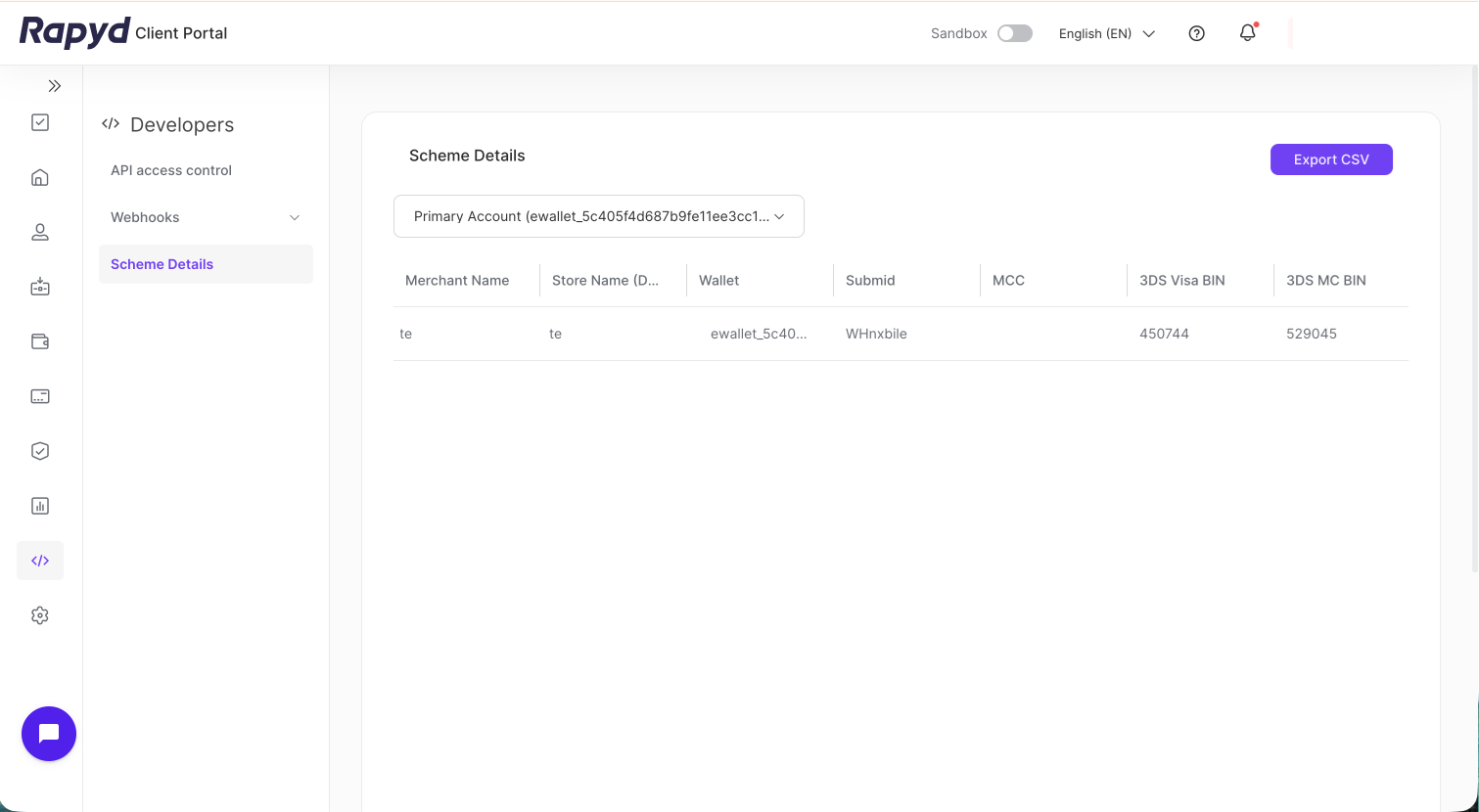
Merchant Name - The merchant's name.
Store Name (DBA) - The statement descriptor of the merchant.
Wallet - The wallet reference ID.
Submid - The submerchant ID.
MCC - The merchant category code.
3DS Visa BIN - The Visa BIN for External 3DS.
3DS MC BIN - The Mastercard BIN for External 3DS.
Agreement ID - The agreement ID.
CAID - The card acceptor identifier.
VISA Acquirer BIN - The Visa acquirer BIN.
MC Acquirer BIN - The Mastercard acquirer BIN.
Currency - The currency of the wallet.
To export the table data as a CSV file, click Export CSV. You can open the file in a spreadsheet program, such as Google Sheets or Excel, to review and analyze the data further.