LocalLink
Introduction
LocalLink is an application that runs directly on PAX payment terminals and manages communication with third-party ECR/EPOS systems over a local network. It exposes a REST API on the terminal, providing a secure and straightforward way for ECR systems to interact with the payment terminal via USB or local wifi.
This documentation includes:
A general overview of how the communication flow works
Detailed instructions for integrating with LocalLink
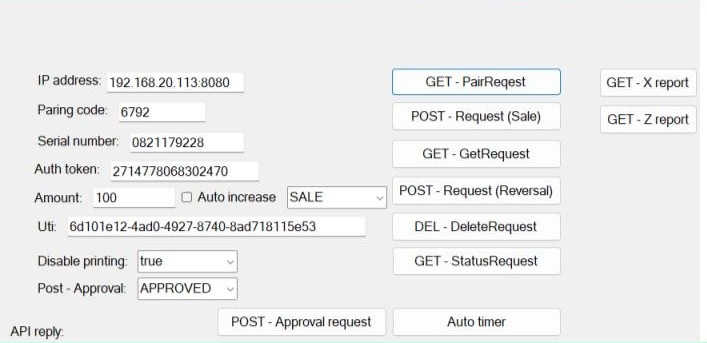
A C# test application demonstrating how to communicate with the terminal, including both setup instructions and sample code
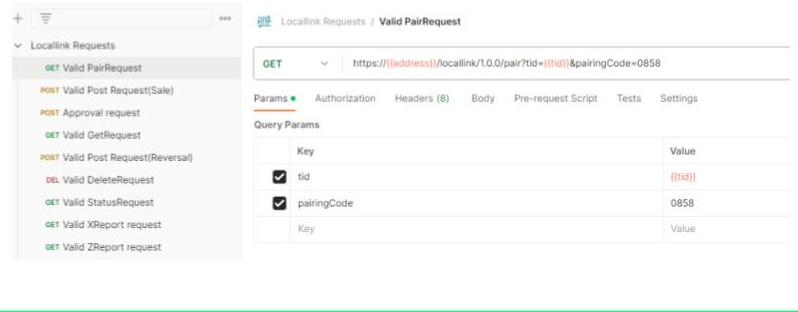
A Postman collection that can be imported directly and covers all available features
LocalLink Transaction Flow
Click here to download the test app.
Transaction Flow Sale
Sample 1
{
"appName":"4D4320435245444954",
"applicationId":"A0000000041010",
"authCode":"814113",
"cardholderReceipt":[See next sample],
"cardholderVerificationMethod":"CVM_NO_CVM",
"currencyCode":"826",
"dccAmount":0,
"dccCommissionAmount":0,
"dccExchangeRate":0.0,
"dccTransaction":false,
"id":24,
"isCustomCardData":false,
"merchantId":"800574917121001",
"merchantReceipt":[See next sample],
"messageId":3,
"primaryAccountNumber":"541333******0036",
"signature":false,
"statuses":„
[\"Transaction started\",
\"Contactless card read\",
\"Contactless card read\",
\"Transaction approved\",
\"Transaction finished\"]",
"terminalId":"34550535",
"tipAmount":0,
"totalAmount":"100",
"transApproved":true,
"transCancelled":false,
"transSource":"500",
"transactionDate":"Nov 22, 2023 13:35:18",
"transactionResponse":"00",
"transactionSource":"PICC",
"transactionType":"SALE",
"uti":"40b46f56-9aab-44fa-8c19-c682895ca51c",
"voided":false
}
Sample 2
{
"cardholderReceipt":[
["CARDHOLDER COPY","5","C","B"],
[],
["Valitor test","5","L","B"],
["#{ADDR1}","5","L","B"],
["#{ADDR2}","5","L","B"],
[],
["22/11/23","13:35","5","S","N"],
["MC CREDIT","9","L","I"],
["************0036","5","L","N"],
[],
["AUTHORISED - 814113","5","C","B"],
[],
[],
[],
["SALE","5","C","N"],
["Amount","9","C","B"],
["£1.00","9","C","B"],
["NO VERIFICATION","5","L","N"],
["CONTACTLESS","5","L","N"],
["ReceiptNo: 3","1","L","N"],
["***********1001","*****535","1","S","N"],
["A0000000041010","1","L","N"],
[]
],
"merchantReceipt":[
["MERCHANT COPY","5","C","B"],
[],
["Valitor test","5","L","B"],
[„Dalshraun 3","5","L","B"],
[„220 Hafnarfjörður","5","L","B"],
[],
["22/11/23","13:35","5","S","N"],
["MC CREDIT","9","L","I"],
["541333******0036","5","L","N"],
[],
["AUTHORISED - 814113","5","C","B"],
[],
[],
[],
["SALE","5","C","N"],
["Amount","9","C","B"],
["£1.00","9","C","B"],
["NO VERIFICATION","5","L","N"],
["CONTACTLESS","5","L","N"],
["ReceiptNo: 3","1","L","N"],
["800574917121001",
"34550535","1","S","N"],
["A0000000041010","1","L","N"],[]
]
}
LocalLink Detailed Instructions
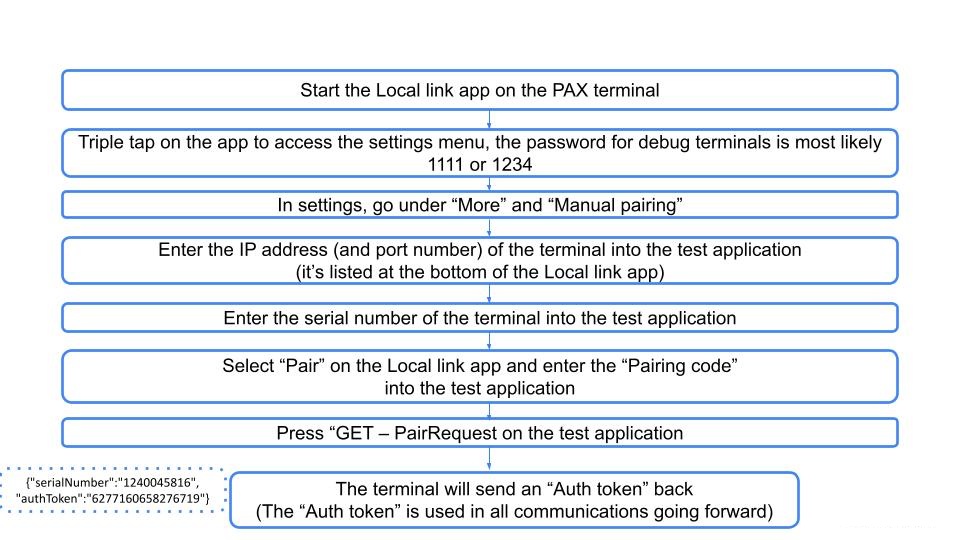
The terminal listens on port 8080.
Launch the LocalLink application on the terminal.
In your system, enter the IP address displayed at the bottom of the terminal screen.
Enter the terminal serial number shown on the barcode label at the bottom of the device.
In the LocalLink app, select “Pair”.
Enter the pairing code into your system, then send a GET – PairRequest.
The pairing response will return an authToken, which must be included in the request header for all subsequent API calls.
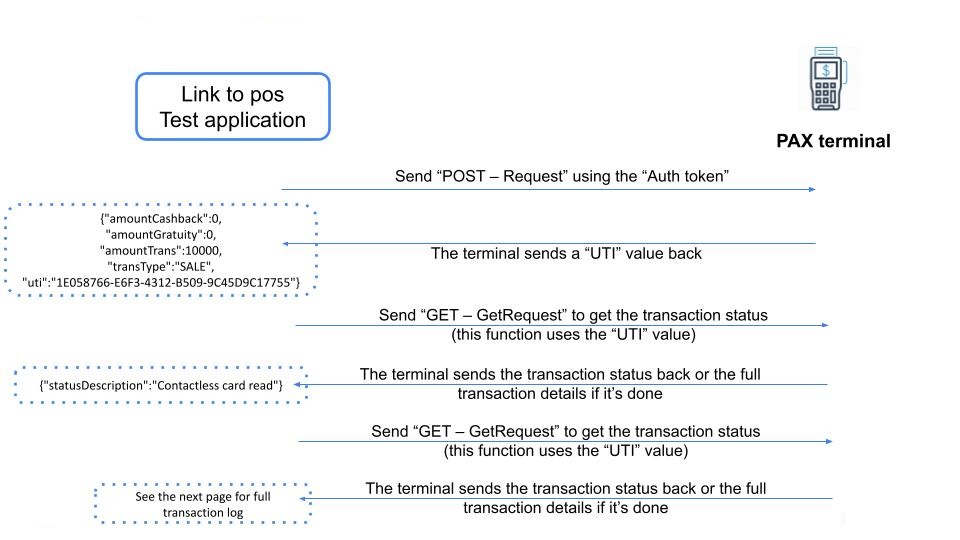
When submitting a sale request, a UTI is returned. This UTI is then used to query the transaction status via GetRequest.
Printing With LocalLink
All app2app receipts use the same format. You can also use this format and send strings to the Rapyd core app to get your strings printed. The text format is as follows:
[“Text”, “size”, “location”, “style”] Or with two text strings in one line: [“Text left”, “text right”, “size”, “location”, “style”] Size: * 1 = Small * 5 = Medium (default) * 9 = Tall Location (both upper- and lower-case letters work): * L = Left justified (default) * C = Center text * R = Right justified * S = Split (two texts in the line) | Style (both upper- and lower-case letters work): * N = Normal (default) * B = Bold * I = Italic * U = Underline If you just send [“text”] then the default size, location, and style values are used. An empty line is [] Test string: ["Cardholder copy", "5", "C", "B"] ["dagsetning", "timi", "5", "s", "n“] |
List of Endpoints
Setup
To setup a Locallink terminal, press the pair button on first startup. Send a pairing request with the displayed pairing code, retrieve the auth bearer token and pass it in with all further requests. The available endpoints are in the following table:
Endpoint | URL parameters | Request body | Description |
|---|---|---|---|
|
| Not applicable. | Request used to pair a device. The pairing code shown on the device needs to bent. An auth bearer token is returned in the response body, this needs to be sent with all further requests.
|
|
|
| Request to start a transaction. Locallink will respond with a 200 with the following body if transaction is successfully started:
The uti needs to be used when calling the GET endpoint to get the transaction status. |
|
| Not applicable. | Request to see the status of a transaction. The uti of the transaction is passed in as an URL parameter. Returns 400 if transaction is not found or a 200 with the transaction status/result in the response body. For custom card transactions the following response body will be returned. In this case the caller should send the result to the result endpoint.
|
|
| Not applicable. | Request used to cancel an ongoing transaction. A transaction can only be canceled before card has been read. Sending cancel after card read or when no transaction is ongoing will have no effect. |
|
|
| Request to approve or decline a custom card transaction. E.g. a bonus card where the authorization is handled by some internal system. The POS will show the passed in result on the screen. |
|
| Not applicable. | Request to send the EOD report for the terminal. Setting For the ZReport the result object will look like, empty result objects means that the request failed:
For the XReport the result will look as follows:
|
|
| Not applicable. | Request to check if the terminal is available to received a command. Terminal will respond with the following:
|
Transaction Result Example
{
    "appName": "5649534120435245444954",
    "applicationId": "A0000000031010",
    "authCode": "796516",
    "cardholderReceipt": , // Cardholder receipt, hidden for brewity
    "cardholderVerificationMethod": "CVM_NO_CVM",
    "currencyCode": "352",
    "dccAmount": 0,
    "dccCommissionAmount": 0,
    "dccExchangeRate": 0.0,
    "dccTransaction": false,
    "id": 48,
    "isCustomCardData": false,
    "merchantId": "800573916121001",
    "merchantReceipt": , // Merchant receipt, hidden for brewity
    "messageId": 341,
    "primaryAccountNumber": "476173******0010",
    "signature": false,
    "statuses": "[\"Transaction started\",\"Contactless card read\",\"Transaction approved\",\"Transaction finished\"]",
    "terminalId": "34550576",
    "tipAmount": 0,
    "totalAmount": "500000",
    "transSource": "400",
    "transactionDate": "Oct 5, 2023 9:21:58 AM",
    "transactionResponse": "00",
    "transactionSource": "PICC",
    "transactionType": "SALE",
    "uti": "9e3b9d36-1bcb-4261-b944-8cf1f88777f7"
}
Postman Collection
Click here to download the LocalLink Postman collection.